> ## Documentation Index
> Fetch the complete documentation index at: https://docs.gtm-api.com/llms.txt
> Use this file to discover all available pages before exploring further.
# Antidetect browsers and proxies
> Every LinkedIn account runs in its own isolated browser profile with a stable fingerprint and its own proxy. What the browser does, how proxies attach, and how to diagnose both.
Every connected LinkedIn account lives in exactly one antidetect browser: an isolated
browser profile with a stable device fingerprint and its own proxy. LinkedIn always sees
the same device in the same location, which is what keeps automated activity looking
like the account's normal usage. You never hand over the LinkedIn password; the login
happens inside that browser.
## Browser lifecycle
A browser is **created** (cloud-minted or bring-your-own), **run** when work needs it,
and **stopped** when idle.
An idle running browser is suspended automatically after about 15 minutes without
activity, and due syncs or actions wake it on their own. See
[Sync windows and auto-suspend](/kb/sync-windows-and-auto-suspend).
If a running browser becomes unhealthy (its LinkedIn tab dies, the profile crashes), the
platform marks it with an issue status and powers it off instead of leaving it running
blind. Fix the underlying problem, most often the proxy, then run it again. Deleting a
browser removes the profile; the bound LinkedIn account can be reconnected later through
a new browser.
## Where to see all of this
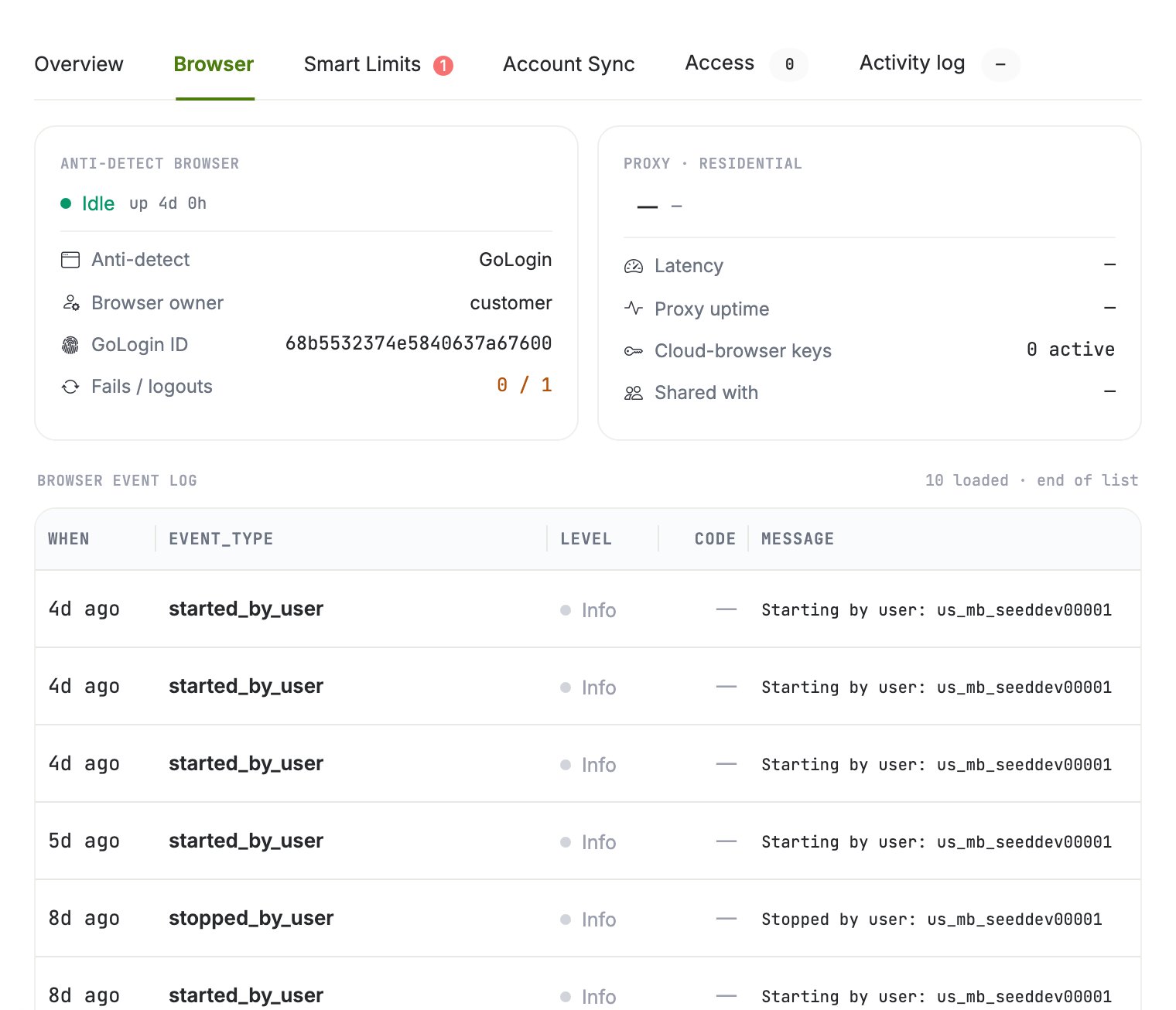
Open the account's drawer on the **Senders** page and switch to the **Browser** tab: the
browser block (vendor, owner, status, fails and logouts), the proxy block (latency,
uptime), and the event log underneath.
 ## Proxies: cloud and BYO
* **Cloud-minted browsers require a proxy.** You pick the country when creating the
browser; the platform attaches the least-loaded active proxy from the pool in that
country automatically.
* **Bring-your-own browsers keep their own.** An existing vendor profile (for example
GoLogin) arrives with its proxy; the platform reads the session and never changes the
proxy.
Choose the proxy country to match where the account genuinely operates. A sudden country
change is a classic trigger for LinkedIn verification challenges, and changing the proxy
of a live browser restarts it: a running session keeps the old proxy until the browser
respawns.
## Diagnose a proxy
Two checks are available per browser in the drawer:
| Check | What it verifies |
| ------------------ | ----------------------------------------------------- |
| Connectivity check | The proxy actually answers |
| Location check | The proxy's real-world geo matches what is configured |
If LinkedIn does not load inside the browser, run the connectivity check first. A
browser whose proxy is dead cannot sync or act; parked work resumes automatically once
the browser is healthy again.
## The same over the API
```bash curl theme={null}
# List the team's browsers with their status
curl -X POST "https://app.gtm-api.com/linkedin/v4/api/antidetect-browsers/search" \
-H "Authorization: Bearer gtm_live_YOUR_KEY" \
-H "Content-Type: application/json" \
-d '{"filter": {"status": {"eq": "running"}}}'
```
```typescript TypeScript theme={null}
const res = await fetch(
"https://app.gtm-api.com/linkedin/v4/api/antidetect-browsers/search",
{
method: "POST",
headers: {
Authorization: "Bearer gtm_live_YOUR_KEY",
"Content-Type": "application/json",
},
body: JSON.stringify({ filter: { status: { eq: "running" } } }),
},
);
const { items } = await res.json();
```
`POST /api/antidetect-browsers/run` and `/stop` control the session,
`/update-proxy` moves a browser to another proxy (country included), and
`/replace-proxy` rotates the IP in place. The full contract lives in the
[API reference](/api-reference/overview).
## Related
* [Connect a LinkedIn account](/kb/connect-a-linkedin-account)
* [Sync windows and auto-suspend](/kb/sync-windows-and-auto-suspend)
* [Smart limits and warmup](/kb/smart-limits-and-warmup)
## Proxies: cloud and BYO
* **Cloud-minted browsers require a proxy.** You pick the country when creating the
browser; the platform attaches the least-loaded active proxy from the pool in that
country automatically.
* **Bring-your-own browsers keep their own.** An existing vendor profile (for example
GoLogin) arrives with its proxy; the platform reads the session and never changes the
proxy.
Choose the proxy country to match where the account genuinely operates. A sudden country
change is a classic trigger for LinkedIn verification challenges, and changing the proxy
of a live browser restarts it: a running session keeps the old proxy until the browser
respawns.
## Diagnose a proxy
Two checks are available per browser in the drawer:
| Check | What it verifies |
| ------------------ | ----------------------------------------------------- |
| Connectivity check | The proxy actually answers |
| Location check | The proxy's real-world geo matches what is configured |
If LinkedIn does not load inside the browser, run the connectivity check first. A
browser whose proxy is dead cannot sync or act; parked work resumes automatically once
the browser is healthy again.
## The same over the API
```bash curl theme={null}
# List the team's browsers with their status
curl -X POST "https://app.gtm-api.com/linkedin/v4/api/antidetect-browsers/search" \
-H "Authorization: Bearer gtm_live_YOUR_KEY" \
-H "Content-Type: application/json" \
-d '{"filter": {"status": {"eq": "running"}}}'
```
```typescript TypeScript theme={null}
const res = await fetch(
"https://app.gtm-api.com/linkedin/v4/api/antidetect-browsers/search",
{
method: "POST",
headers: {
Authorization: "Bearer gtm_live_YOUR_KEY",
"Content-Type": "application/json",
},
body: JSON.stringify({ filter: { status: { eq: "running" } } }),
},
);
const { items } = await res.json();
```
`POST /api/antidetect-browsers/run` and `/stop` control the session,
`/update-proxy` moves a browser to another proxy (country included), and
`/replace-proxy` rotates the IP in place. The full contract lives in the
[API reference](/api-reference/overview).
## Related
* [Connect a LinkedIn account](/kb/connect-a-linkedin-account)
* [Sync windows and auto-suspend](/kb/sync-windows-and-auto-suspend)
* [Smart limits and warmup](/kb/smart-limits-and-warmup)