> ## Documentation Index
> Fetch the complete documentation index at: https://docs.gtm-api.com/llms.txt
> Use this file to discover all available pages before exploring further.
# Smart limits and warmup
> Per-action daily budgets protect every LinkedIn account, and a warmup ramp grows them as a new account proves itself. How budgets, holds and warmup work.
Smart limits budget how many actions of each kind a LinkedIn account may perform per
day. They are on by default for every connected account and every outbound call checks
them server-side before dispatch: work that would exceed a budget is parked, not lost.
## How budgets work
Every action type (connection requests, messages, profile visits, endorsements, and so
on) has its own daily bucket. When a bucket is spent, further actions of that kind wait
until the budget refreshes. Parked work resumes automatically as soon as the limit
releases; nothing needs re-queuing.
 ## Warmup
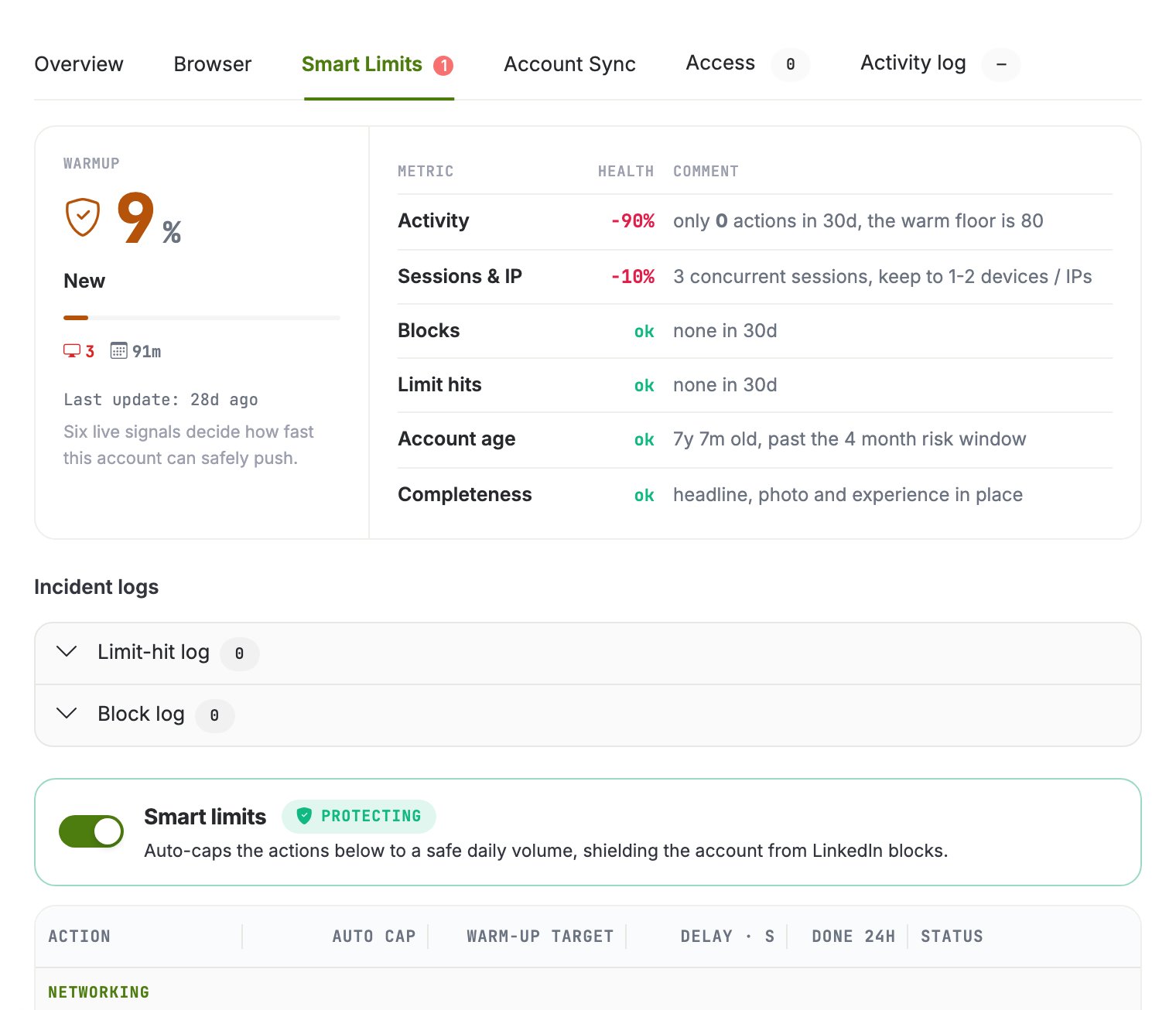
A freshly connected account starts with reduced budgets that ramp up gradually. The ramp
is driven by six live signals about the account, shown in the drawer: recent activity,
concurrent sessions and IPs, blocks, limit hits, account age, and profile completeness.
They multiply into the day's allowance.
Warmup counts real sends: activity the account actually performed matters, not just
time passed. A dormant account ramps slower than one that is actively and successfully
working.
## Limit statuses
| Status | Meaning |
| ------------------ | -------------------------------------------------------------------------------------------------------------------- |
| `active` | Budgets available, actions flow normally |
| `held` | The current budget is spent; outbound actions are parked until the refresh. The normal daily-cap state, not an error |
| `linkedin_blocked` | LinkedIn itself restricted the account; actions stay parked until the restriction clears |
## Raise a limit, release a hold
Limits are editable per account in the drawer. Raising a limit offers **reset hold**,
which atomically raises the budget and resumes everything parked on it in one step.
Without reset hold, the raised budget takes effect on the next refresh cycle.
```bash curl theme={null}
# Read an account's current buckets and what is spent today
curl -X POST "https://app.gtm-api.com/linkedin/v4/api/linkedin-account-smart-limits/search" \
-H "Authorization: Bearer gtm_live_YOUR_KEY" \
-H "Content-Type: application/json" \
-d '{"filter": {"linkedin_account_sid": {"eq": "ln_ac_YOUR_ACCOUNT"}}}'
```
```bash reset-hold theme={null}
# Raise a bucket and release its hold in one step
curl -X POST "https://app.gtm-api.com/linkedin/v4/api/linkedin-account-smart-limits/lm_sl_YOUR_LIMIT/reset-hold" \
-H "Authorization: Bearer gtm_live_YOUR_KEY" \
-H "Content-Type: application/json" \
-d '{}'
```
Hitting a budget over the API answers `limit_exceeded`. The action can resume the next
day or after the limit is raised; the account is not penalized for your retry logic.
## Related
* [Sync windows and auto-suspend](/kb/sync-windows-and-auto-suspend)
* [Antidetect browsers and proxies](/kb/antidetect-browsers-and-proxies)
* [Run a mass action](/guides/run-a-mass-action)
## Warmup
A freshly connected account starts with reduced budgets that ramp up gradually. The ramp
is driven by six live signals about the account, shown in the drawer: recent activity,
concurrent sessions and IPs, blocks, limit hits, account age, and profile completeness.
They multiply into the day's allowance.
Warmup counts real sends: activity the account actually performed matters, not just
time passed. A dormant account ramps slower than one that is actively and successfully
working.
## Limit statuses
| Status | Meaning |
| ------------------ | -------------------------------------------------------------------------------------------------------------------- |
| `active` | Budgets available, actions flow normally |
| `held` | The current budget is spent; outbound actions are parked until the refresh. The normal daily-cap state, not an error |
| `linkedin_blocked` | LinkedIn itself restricted the account; actions stay parked until the restriction clears |
## Raise a limit, release a hold
Limits are editable per account in the drawer. Raising a limit offers **reset hold**,
which atomically raises the budget and resumes everything parked on it in one step.
Without reset hold, the raised budget takes effect on the next refresh cycle.
```bash curl theme={null}
# Read an account's current buckets and what is spent today
curl -X POST "https://app.gtm-api.com/linkedin/v4/api/linkedin-account-smart-limits/search" \
-H "Authorization: Bearer gtm_live_YOUR_KEY" \
-H "Content-Type: application/json" \
-d '{"filter": {"linkedin_account_sid": {"eq": "ln_ac_YOUR_ACCOUNT"}}}'
```
```bash reset-hold theme={null}
# Raise a bucket and release its hold in one step
curl -X POST "https://app.gtm-api.com/linkedin/v4/api/linkedin-account-smart-limits/lm_sl_YOUR_LIMIT/reset-hold" \
-H "Authorization: Bearer gtm_live_YOUR_KEY" \
-H "Content-Type: application/json" \
-d '{}'
```
Hitting a budget over the API answers `limit_exceeded`. The action can resume the next
day or after the limit is raised; the account is not penalized for your retry logic.
## Related
* [Sync windows and auto-suspend](/kb/sync-windows-and-auto-suspend)
* [Antidetect browsers and proxies](/kb/antidetect-browsers-and-proxies)
* [Run a mass action](/guides/run-a-mass-action)