> ## Documentation Index
> Fetch the complete documentation index at: https://docs.gtm-api.com/llms.txt
> Use this file to discover all available pages before exploring further.
# Sync windows and auto-suspend
> Recurring syncs run inside each account's configured hours, idle browsers suspend themselves, and due work wakes them. What is window-gated and what is not.
Each LinkedIn account has a **sync window**: the days and hours during which recurring
synchronizations (inbox, connections, invitations, followers) are created and picked
up. Outside the window no new recurring sync starts.
 ## What the window gates, and what it does not
* **Recurring syncs are window-gated.** Conversations, connections, invitations,
followers and profile refreshes are scheduled only inside the configured hours.
* **Actions are not.** Sending a message or a connection request runs whenever you or
an automation triggers it, at any hour, subject to
[smart limits](/kb/smart-limits-and-warmup).
* **Onboarding respects the window.** The initial import of a freshly connected account
runs within the configured hours.
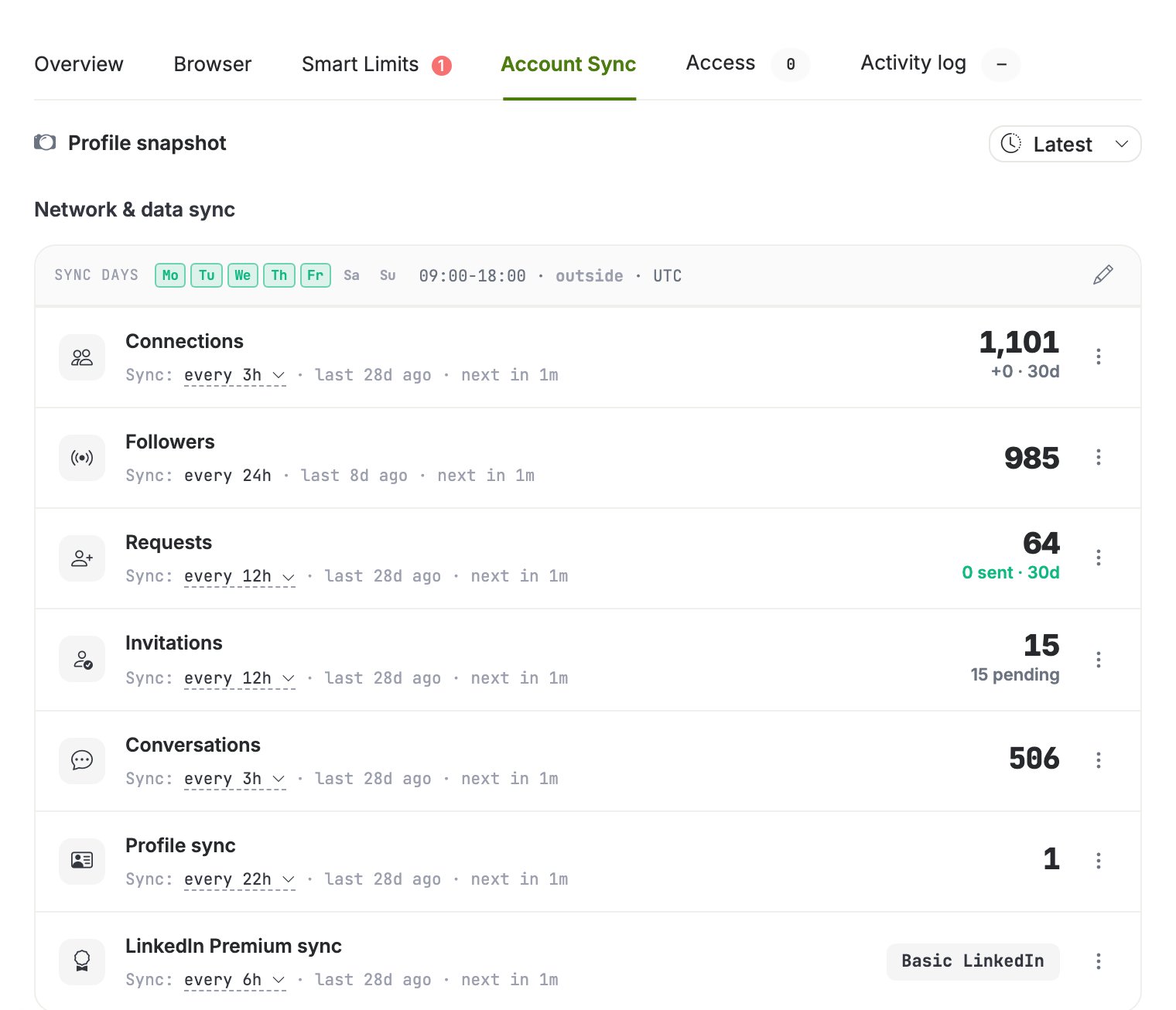
Edit the window and the per-kind intervals on the **Account Sync** tab of the account
drawer. Each sync kind shows its interval, the last run and the next due time.
## Browser auto-suspend and wake
A running antidetect browser costs resources, so idle browsers suspend automatically:
after about 15 minutes without activity the platform stops the browser.
Waking is automatic too:
* an **action** waits for the browser to start, then runs;
* a due **sync** wakes the browser in the background.
You never need to start browsers manually for scheduled work. A browser you stopped
yourself stays stopped for manual use, but due syncs and actions still wake it.
## Health checks
The platform periodically verifies that each running browser is actually responsive. A
browser whose LinkedIn tab is dead is marked with an issue status and powered off rather
than left running blind; the account's sync state shows the reason.
## Change the schedule over the API
The window is a list of per-weekday entries in the account's timezone, minutes from
local midnight. Weekdays 1 to 5 (Monday to Friday), 09:00 to 18:00:
```bash curl theme={null}
curl -X POST "https://app.gtm-api.com/linkedin/v4/api/linkedin-accounts/ln_ac_YOUR_ACCOUNT/update-sync-config" \
-H "Authorization: Bearer gtm_live_YOUR_KEY" \
-H "Content-Type: application/json" \
-d '{
"sync_config": {
"timezone": "Europe/Amsterdam",
"window": [
{"day_of_week": 1, "start_minute": 540, "end_minute": 1080},
{"day_of_week": 2, "start_minute": 540, "end_minute": 1080},
{"day_of_week": 3, "start_minute": 540, "end_minute": 1080},
{"day_of_week": 4, "start_minute": 540, "end_minute": 1080},
{"day_of_week": 5, "start_minute": 540, "end_minute": 1080}
]
}
}'
```
```typescript TypeScript theme={null}
const window = [1, 2, 3, 4, 5].map((day_of_week) => ({
day_of_week, // ISO weekday: 1=Mon … 7=Sun
start_minute: 9 * 60, // minutes from local midnight
end_minute: 18 * 60,
}));
await fetch(
"https://app.gtm-api.com/linkedin/v4/api/linkedin-accounts/ln_ac_YOUR_ACCOUNT/update-sync-config",
{
method: "POST",
headers: {
Authorization: "Bearer gtm_live_YOUR_KEY",
"Content-Type": "application/json",
},
body: JSON.stringify({
sync_config: { timezone: "Europe/Amsterdam", window },
}),
},
);
```
Omit `window` entirely to sync around the clock. Per-kind intervals ride the same
request's `entries` object.
Field names and the full request shape are in the
[API reference](/api-reference/overview); to change the schedule for every account on
the team in one confirmation, use a [mass action](/guides/run-a-mass-action).
## Related
* [Antidetect browsers and proxies](/kb/antidetect-browsers-and-proxies)
* [Smart limits and warmup](/kb/smart-limits-and-warmup)
## What the window gates, and what it does not
* **Recurring syncs are window-gated.** Conversations, connections, invitations,
followers and profile refreshes are scheduled only inside the configured hours.
* **Actions are not.** Sending a message or a connection request runs whenever you or
an automation triggers it, at any hour, subject to
[smart limits](/kb/smart-limits-and-warmup).
* **Onboarding respects the window.** The initial import of a freshly connected account
runs within the configured hours.
Edit the window and the per-kind intervals on the **Account Sync** tab of the account
drawer. Each sync kind shows its interval, the last run and the next due time.
## Browser auto-suspend and wake
A running antidetect browser costs resources, so idle browsers suspend automatically:
after about 15 minutes without activity the platform stops the browser.
Waking is automatic too:
* an **action** waits for the browser to start, then runs;
* a due **sync** wakes the browser in the background.
You never need to start browsers manually for scheduled work. A browser you stopped
yourself stays stopped for manual use, but due syncs and actions still wake it.
## Health checks
The platform periodically verifies that each running browser is actually responsive. A
browser whose LinkedIn tab is dead is marked with an issue status and powered off rather
than left running blind; the account's sync state shows the reason.
## Change the schedule over the API
The window is a list of per-weekday entries in the account's timezone, minutes from
local midnight. Weekdays 1 to 5 (Monday to Friday), 09:00 to 18:00:
```bash curl theme={null}
curl -X POST "https://app.gtm-api.com/linkedin/v4/api/linkedin-accounts/ln_ac_YOUR_ACCOUNT/update-sync-config" \
-H "Authorization: Bearer gtm_live_YOUR_KEY" \
-H "Content-Type: application/json" \
-d '{
"sync_config": {
"timezone": "Europe/Amsterdam",
"window": [
{"day_of_week": 1, "start_minute": 540, "end_minute": 1080},
{"day_of_week": 2, "start_minute": 540, "end_minute": 1080},
{"day_of_week": 3, "start_minute": 540, "end_minute": 1080},
{"day_of_week": 4, "start_minute": 540, "end_minute": 1080},
{"day_of_week": 5, "start_minute": 540, "end_minute": 1080}
]
}
}'
```
```typescript TypeScript theme={null}
const window = [1, 2, 3, 4, 5].map((day_of_week) => ({
day_of_week, // ISO weekday: 1=Mon … 7=Sun
start_minute: 9 * 60, // minutes from local midnight
end_minute: 18 * 60,
}));
await fetch(
"https://app.gtm-api.com/linkedin/v4/api/linkedin-accounts/ln_ac_YOUR_ACCOUNT/update-sync-config",
{
method: "POST",
headers: {
Authorization: "Bearer gtm_live_YOUR_KEY",
"Content-Type": "application/json",
},
body: JSON.stringify({
sync_config: { timezone: "Europe/Amsterdam", window },
}),
},
);
```
Omit `window` entirely to sync around the clock. Per-kind intervals ride the same
request's `entries` object.
Field names and the full request shape are in the
[API reference](/api-reference/overview); to change the schedule for every account on
the team in one confirmation, use a [mass action](/guides/run-a-mass-action).
## Related
* [Antidetect browsers and proxies](/kb/antidetect-browsers-and-proxies)
* [Smart limits and warmup](/kb/smart-limits-and-warmup)