

Browser lifecycle
A browser is created (cloud-minted or bring-your-own), run when work needs it, and stopped when idle.An idle running browser is suspended automatically after about 15 minutes without
activity, and due syncs or actions wake it on their own. See
Sync windows and auto-suspend.
Where to see all of this
Open the account’s drawer on the Senders page and switch to the Browser tab: the browser block (vendor, owner, status, fails and logouts), the proxy block (latency, uptime), and the event log underneath.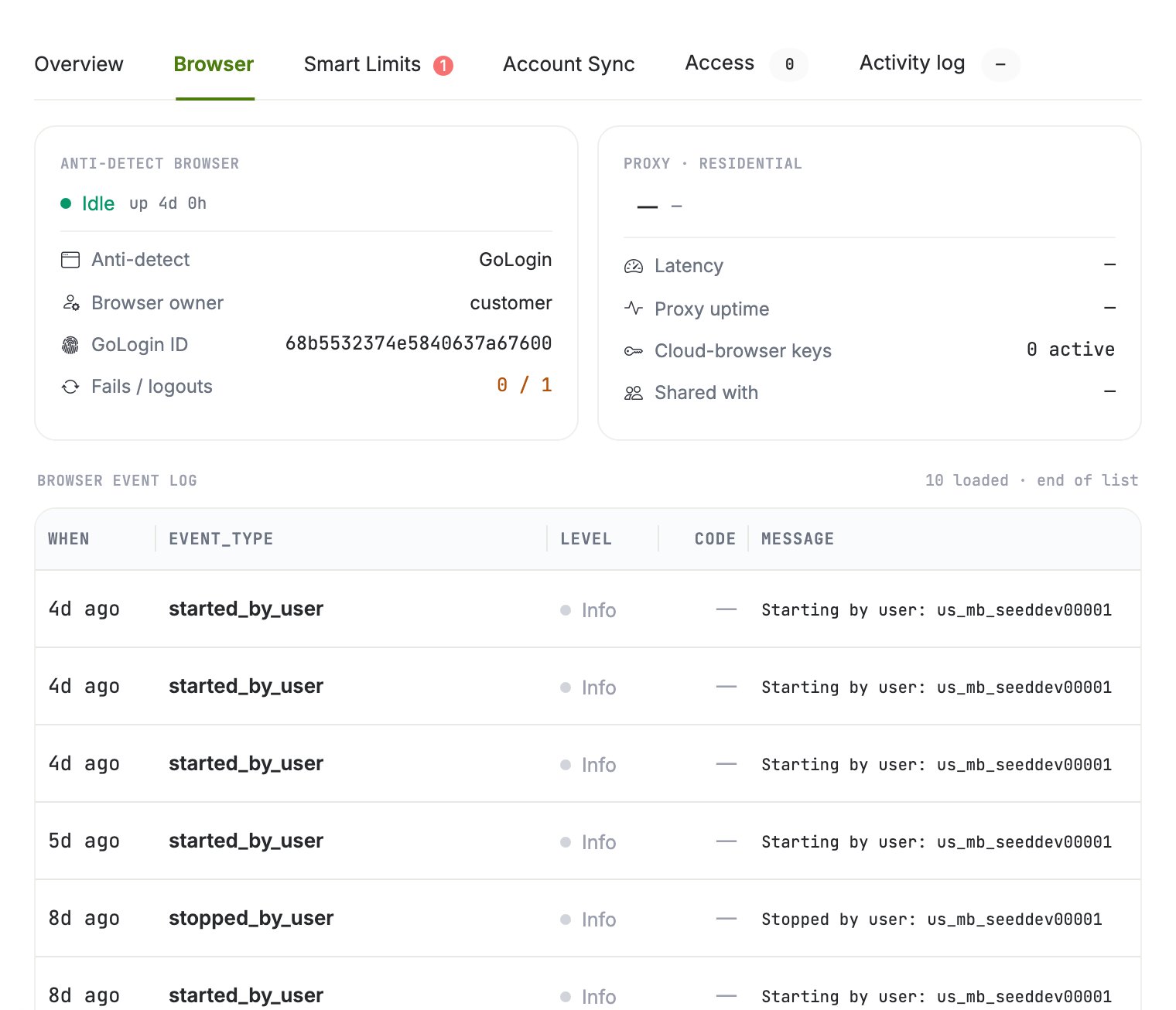
The Browser tab of the account drawer: browser state on the left, proxy health on the right, the event log below.
Connect a profile you already own
Instead of letting the platform mint a browser, you can bind a GoLogin profile that already exists in your own account. Open Senders, click Connect account, switch to Existing profile ID. The profile keeps its own proxy and its own fingerprint, and it stays yours. The one thing that trips people up: we read that profile through our GoLogin account, not through yours. GoLogin’s API only answers for profiles the calling account can see, so a profile sitting in your account is invisible to us until you share it.1
Share the profile with us in GoLogin
Open the profile in GoLogin, click Share, and add pro@getsales.io.The share has to let us RUN the profile, not only see it. Before anything is created we read
GoLogin’s own run signals for our account: the profile’s
canBeRunning flag, the share’s
runProfile permission, and whether GoLogin has switched running off for it. A view-only share
is refused right there.2
Session Lock can stay on
GoLogin’s Session Lock (the padlock on the profile,
lockEnabled) is not a permission and we do
not read it. It only stops a second launch while the profile is already running somewhere, so
keep one thing in mind: while your sender is running here, the profile will not open on your
desktop, and if it is open on your desktop, a start from here fails until you close it.3
Paste the profile ID
Copy the profile ID from GoLogin (the long hex string, e.g.
88857ca36ce45f284aab6213) and paste
it into GoLogin profile ID, then click Verify & connect.Sharing a profile does not hand over your GoLogin account, and we never change the profile’s
proxy or fingerprint. Un-share it in GoLogin whenever you want; the browser stops working on our
side and nothing else about your account changes.
Proxies: cloud and BYO
- Cloud-minted browsers require a proxy. You pick the country when creating the browser; the platform attaches the least-loaded active proxy from the pool in that country automatically.
- Bring-your-own browsers keep their own. An existing vendor profile (for example GoLogin) arrives with its proxy; the platform reads the session and never changes the proxy.
Diagnose a proxy
Two checks are available per browser in the drawer:
If LinkedIn does not load inside the browser, run the connectivity check first. A
browser whose proxy is dead cannot sync or act; parked work resumes automatically once
the browser is healthy again.
The same over the API
POST /api/antidetect-browsers/run and /stop control the session,
/update-proxy moves a browser to another proxy (country included), and
/replace-proxy rotates the IP in place. The full contract lives in the
API reference.