

How budgets work
Every action type (connection requests, messages, profile visits, endorsements, and so on) has its own daily bucket. When a bucket is spent, further actions of that kind wait until the budget refreshes. Parked work resumes automatically as soon as the limit releases; nothing needs re-queuing.Pacing: one call at a time
Inside the day, calls of one bucket leave one at a time with a gap between them. The gap is the bucket’sdelay_in_seconds, varied by up to 20% per call; there is no burst, two calls of
one bucket never leave together. Reads are paced in single seconds, actions in tens of
seconds; connection requests and posts are deliberately slower. The number is per account and
editable (delay_in_seconds 1..3600), and the platform’s own value for the account comes back
on every row as recommended_delay_in_seconds.
An undo (unreact, delete a comment or a post, unendorse, unfollow, withdraw a request, recall a
message) waits 2 seconds instead of the bucket’s gap, so an action and its undo fit back to back.
The slot is reserved before the call leaves, so two calls fired in the same second never reach
LinkedIn together: the second one queues behind the first. What the caller sees depends on how
long the queue is:
Parallel calls on one account therefore buy nothing. Run them one after another, or spread the
work over several accounts: every account paces on its own.
A success names the same clock, so there is no need to run into the gap to learn it. Every
response whose call reached LinkedIn carries a
pacing block:
next_call_after is the moment the same call goes through again without waiting: the next slot
while the day has budget left, the daily reset when it has none. remaining_today is what the
bucket has left after this call. A call that spends two buckets (a reaction on a post given by
link reads the post first) names the bucket of the action itself and the later of the two clocks.
On top of every bucket, one account starts at most 10 calls a minute.
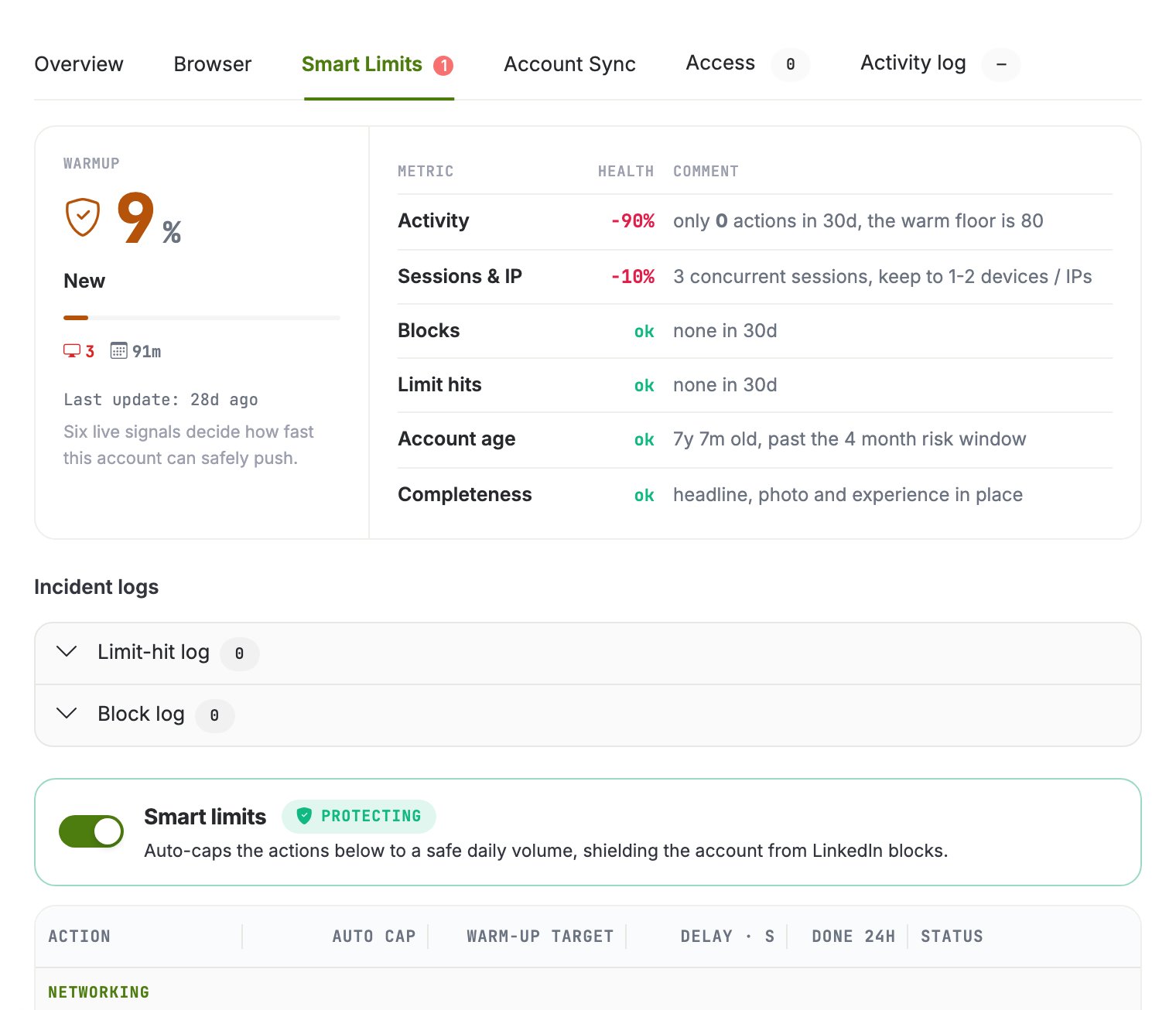
The Smart Limits tab of the account drawer: the warmup score with its six signals, incident logs, and the per-action caps below.
Warmup
A freshly connected account starts with reduced budgets that ramp up gradually. The ramp is driven by six live signals about the account, shown in the drawer: recent activity, concurrent sessions and IPs, blocks, limit hits, account age, and profile completeness. They multiply into the day’s allowance.Warmup counts real sends: activity the account actually performed matters, not just
time passed. A dormant account ramps slower than one that is actively and successfully
working.
Limit statuses
Smart limits on or off: one switch per account
Smart limits are a single switch on the account, not a setting per bucket. While they are on, the warmup owns every daily cap and pacing number: a request that types one of them by hand is refused with409 and context.reason smart_limits_governed, and the answer names the
fields it refused and the two ways forward. Inside the protected mode you can still bound a
bucket with target_limit (the cap follows min(smart, target) at once) and pin the learner
with learning_enabled.
Turning the switch off hands every number to you: the caps run exactly as typed and the warmup
never touches the account again. That is where accounts get lost, so the drawer asks in words
before switching off, and the MCP tool previews before it commits. Turning it back on
re-derives every cap from the latest snapshot on the spot.
set-smart-limits