

Where to see your plan
The sidebar card is the workspace’s plan and usage at a glance: the plan name and how many account slots are used against the cap.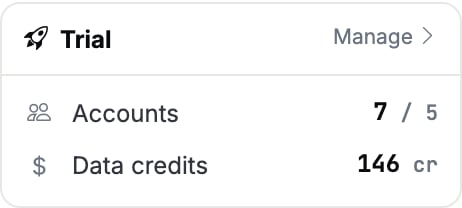
The sidebar plan card: plan name and account slots used against the cap.
Slots can read over the cap (
7 / 5 above) whenever the cap drops below what is already
connected, for example after a paid downgrade. Nothing is deleted. The newest accounts
are parked and their browsers powered off until you free a slot or raise the cap.Sandbox, the forever free plan
Signing up lands you here, with no card and no time limit. Sandbox is one workspace per account: a further workspace you create comes up without capacity until you buy a plan for it. It is the full product on one connected account: the UI, the REST API, the MCP server and every LinkedIn action verb stay available, and the plan caps volume and frequency instead of features.
Three things are genuinely off rather than slowed: webhooks (creating one answers
webhook_limit_reached), team members (the workspace is single-user), and the AI
copilot.
Daily action caps on Sandbox, per connected account:
Two more Sandbox behaviors worth planning around:
- Sync cadence is relaxed. Each sync surface refreshes at most once every 24 hours, and realtime message push is off. Initial backfills after connecting are exempt.
- Idle accounts are parked after 30 days without user-driven activity, and the browser profile is deleted. Reconnecting means logging into LinkedIn again, because the session cookies are gone.
Paid plans
Pricing is per connected account per month, in volume brackets. Every account bills at the bracket its total lands in, so the price per account drops for the whole workspace as you add accounts.
Two allowances do not scale with the account count: 100 webhooks and the session
column above, which is a total for the workspace rather than a per-account number.
- Annual billing is pay for 12 months, get 15 months of service.
- 5G Proxy is an optional add-on at +$15 per selected account per month, for accounts that need a dedicated premium 5G mobile route: commands execute faster, with fewer retries and fewer drops.
Subscription statuses
The workspace itself is either active or suspended, derived from the above:
active is
active, paused is suspended, and past_due stays active until the grace window closes.
When a payment fails
The workspace keeps working for 7 days past the end of the paid period. Update the card within that window and the subscription returns toactive on its own. After it,
the workspace is suspended until payment succeeds.
Card updates happen in the payment provider’s hosted portal, reached through a
short-lived link the API mints
(
POST /api/billing-subscriptions/{sid}/get-update-payment-method-link). Workspaces
billed by sales invoice have no card portal; talk to us instead.When a subscription ends
Cancelling takes effect at the end of the paid period, with no immediate charge and no refund for the remainder. The workspace then falls back to Sandbox and keeps working at free-plan volume: the account cap reconciles to 1, and the accounts beyond the cap are parked newest-first with their browsers powered off. Reconnect or upgrade and they come back. Pausing is the alternative: billing stops at the next period, the workspace is gated like a suspended one, and every account, browser and row is retained until you resume.Changing plan over the API
Seat count is the subscription’squantity, and it is what the account cap follows.
Changing it re-brackets the price automatically. The change is a two-step flow, and the
first step charges nothing:
POST /api/billing-subscriptions/create-checkout,
which returns a checkout_url for a human to complete. The subscription exists once the
payment settles, not when the link opens; an abandoned checkout leaves nothing behind.
Pause, resume, cancel, and add-ons (add-addon, remove-addon) are the remaining verbs
on the same subscription. Add-ons charge prorated immediately; removing one takes effect
at the next period. None of these apply to Sandbox workspaces, which have no payment
provider subscription behind them.