

Before you start
- A connected LinkedIn account with a working browser. It is the executor: its browser pages the source and spends its own scraping budget.
- A Sales Navigator seat on that account for Sales Navigator sources and company decision-makers.
- A standing mass action, if collected leads should be acted on. Author it first with scope
kind: "none"(see Run a mass action) and reference itsma_ac_sid.
Create one in the app
Auto Scrapes in the sidebar (/auto-scrapes), then New auto scrape. Paste a link into Source URL and the form shows
Detected: with the method and result kind, or refuses anything outside the four families below with
“This URL isn’t supported. Use a LinkedIn or Sales Navigator people or company search URL.” Accounts without a seat show as
no Sales Nav seat; Mass action is optional and disabled for company sources. Run #1 dispatches at once. Source and executor
are then frozen (the update form writes Title, Replay and Mass action), so changing the source or the executor means
a new job with a fresh history.
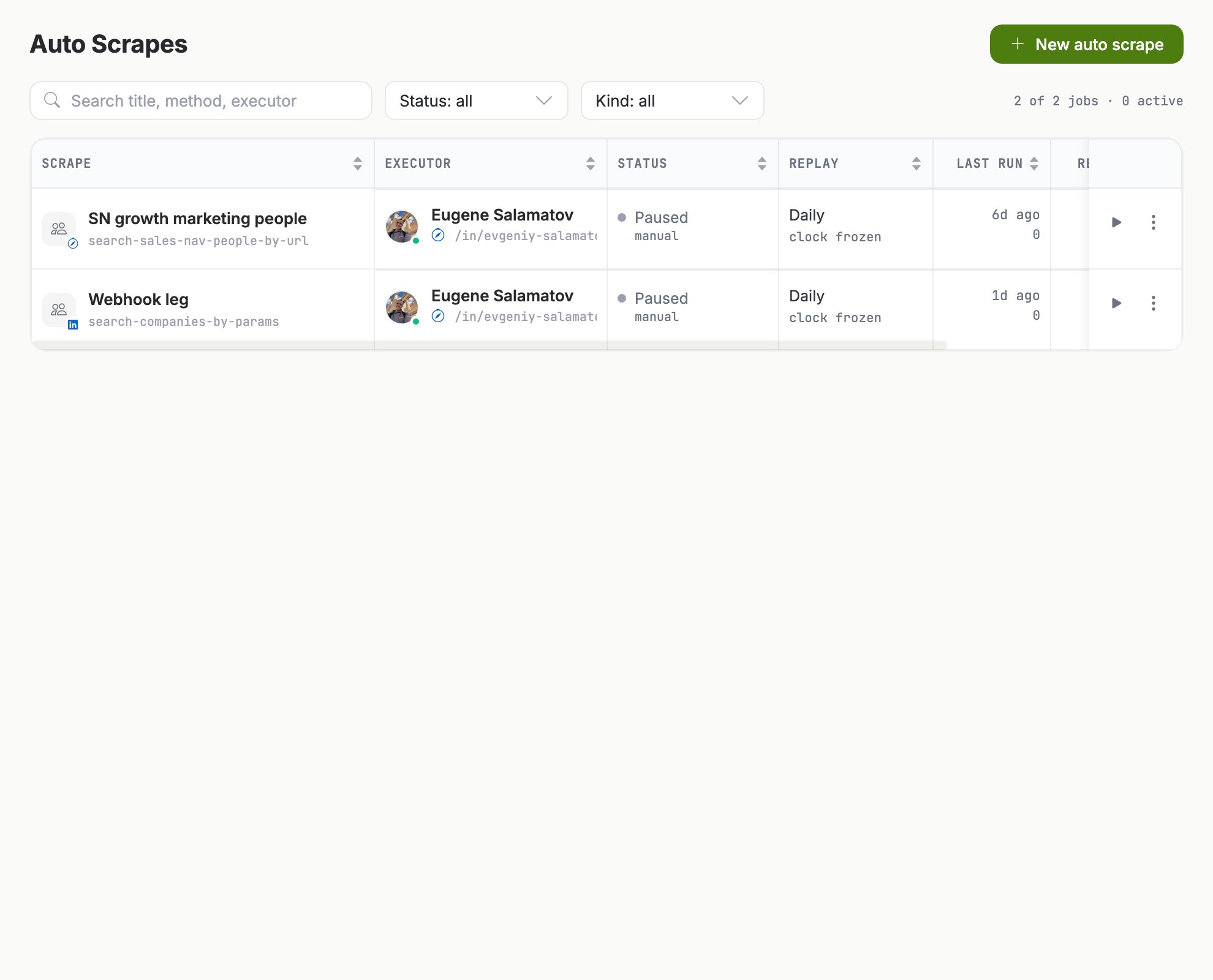
Auto Scrapes: one row per collector, with the method it runs, the account it runs on, its replay cadence and its last run.
Which sources it can run on
The modal classifies four URL families (/search/results/people, /search/results/companies, /sales/search/people,
/sales/search/company) into the matching -by-url method. Over the API the eligible set is 17 paginated verbs, addressed as
source_method plus source_input instead of url:
result_kind is company for the four company searches and similar-companies, person for the rest, frozen at create.
One detail costs a create-time 422: company-decision-makers needs a Sales Navigator seat (sales_nav_required) although its
platform reads as plain LinkedIn. Two more are never checked at create: anchor_company_ln_id must be numeric, and
similar-profiles takes the vanity slug, never a URN (anchor_nickname: "jcooper"). A bad value there still creates the job,
and run #1 fails instead: a non-numeric company anchor lands as company_anchor_not_numeric in error_message.
How often it runs
replay_frequency plans the next run as finish time plus the interval, not on a fixed wall clock: a daily job whose run takes
three hours next runs 24 hours after that run finished.
Two runs of one job never overlap: minting a run parks the clock (
next_run_at becomes null) and only finalizing re-plans
it, so a run in flight picks a cadence change up when it finalizes. next_run_at: null means one of three things, and the
drawer says which: a run is in flight, the job is paused (“clock frozen”), or a one-shot already ran. Auto-scrapes are not
gated by the sync window: a due job runs when it comes due, and a suspended browser wakes.
How runs report themselves
Use the Runs tab, or the runs endpoint. Each run carriesresults_seen (rows the pages returned), new_count (identities
first seen on this run), seen_count (re-sightings) and enrolled_count (leads appended to the mass action, max new_count).
On failure,
error_message names the class:
A reaper scans every 15 minutes and finalizes stuck runs: an
in_progress run with no movement for 2 hours, and a
pending run older than 30 minutes that never started. Both are stamped failed with run_timeout:, releasing the clock.
How leads are deduplicated across runs
Each job keeps its own registry: one row per unique person or company, ever, and a re-sighting updates that row, never adds a second. Scope is the job, not the team, so “new” means new for this collector, and one person can hold a row under several auto-scrapes by design. The match walks an identity ladder, first hit wins: personln_member_id → ln_id → sn_id → nickname, company company_ln_id → nickname.
- Any overlapping identifier matches. Every identifier on the incoming row is probed against its own column, so a LinkedIn sighting and a Sales Navigator sighting of one person collapse onto one row.
- Blanks are filled in, never overwritten. A missing identifier is backfilled onto the existing row, and the
dedup_keystamped at insert is a historical label that never changes. - Rows with no decodable identity are dropped. They count in
results_seen, then are never stored and never enrolled. That, plusseen_count, is why the registry holds fewer rows than the pages showed.
seen_count and undercounting new_count while the row set stays exact. Per-run delta is a filter, not
a flag: first_seen_run_sid equal to a run’s sid gives the leads that run discovered, seen_runs_count the recurrence signal.
Feed a standing mass action
The mass action is authored separately with scopekind: "none", so it starts as a standing run with zero items, and the
auto-scrape appends to it: every new lead becomes one item.
- Link at create with
mass_action_sid, or later withset-mass-action. A new link replaces the previous one, returned asprevious_mass_action_sid, which keeps draining what it holds. - The link applies from the next run. A run gates on the link it was minted with, so nothing enrolls retroactively and a run in flight keeps what it started with.
- Only new leads enroll, and company jobs cannot enroll yet, because no company-capable target family is step-eligible.
enrolled_count below new_count has four causes the aggregate cannot separate: the mass action already held that
lead (healthy), the enrollment hop failed and was logged as a shortfall, the run crashed between saving rows and enrolling them, or it was collect-only.
Pause, restart, or stop one
An exhausted one-shot stays
active with a frozen clock, so Restart now is how you run it again. Sharing the executor
account out, or transferring it, pauses that account’s auto-scrapes with paused_reason: account_unavailable, and when a share
ends the platform resumes exactly those rows. A transfer does not come back: the executor cannot be repointed.
Over the API
Create it with eitherurl or the source_method plus source_input pair, never both.
curl
/linkedin-auto-scrape-results/search, filtered on linkedin_auto_scrape_sid for the whole registry
or first_seen_run_sid for one run’s delta; page_size: 0 answers “how many unique leads has this job collected” in one call.
Request shapes, filters and sorts are in the API reference. page_size tops out at 200 and
asking for more is a validation_failed rather than a clamp; dedup_key needs linkedin_auto_scrape_sid alongside it or it
answers 422 bounded_scan_required, and the same rule covers run_number on the separate runs search; nickname matches
exactly, and no endpoint here supports q.
Create and link errors are 422 unless noted. Neither or both of url and the source_method plus source_input pair
answers validation_failed on field source, and a mass action that is missing, deleted or on another team answers it on field
mass_action_sid. The rest: invalid_url, invalid_source_method (not auto-scrape eligible),
method_not_available (no live wire verb yet), source_input missing the family’s required key, sales_nav_required,
account_not_in_team, mass_action_incompatible (the target family rejects this result_kind), nothing_to_update (PATCH
with neither title nor replay_frequency), and 503 service_unavailable (reason mass_action_registry_unavailable),
retryable, when the cross-check cannot reach Orchestration. The verbs answer 409:
no_mass_action_set, invalid_status_transition (resume on an active job), auto_scrape_not_active (run-now while paused)
and run_in_progress (run-now mid-run).
Watch it with webhooks
There is deliberately no per-page and no per-lead event. Subscribe to both run events, because a failed run’s already-applied
pages wrote durable rows, then call the results search on the payload’s
sid unconditionally, whatever the counters said.
Endpoint setup is in Receive webhooks.
What it costs
Every page runs on the pinned executor account. A page spends that account’s ownscraping smart-limit bucket, one spend per page, and writes a row in Data Requests.
The ceiling is per account, not per job, and the daily scraping budget is warmup-driven, so a young account collects less per day.
Pages are never served from cache. If a collector keeps failing with limit_reached: scraping, lower the cadence or move it to an
account with headroom rather than raising the budget past what warmup supports.
The drawer is a sample plus an export, not a browser. Results loads the newest 100 rows, Runs the newest 50, and the
list page loads up to 200 jobs and filters them in memory. Download CSV exports the rows currently loaded, not the whole
registry: for the full set, page the results endpoint.